Chapter 26
The External Run API
Start an automation from your own server, and wait for or poll its result. Read its run history, and move files in and out of its folders. You will also know every error code the API returns and what to do about it.
26.1Quick start
The External Run API lets your own server start an automation and get its result back.
It needs the Pro plan or above, and an API key with the Read and Write permissions (API keys).
In the API, an automation is called a "worklet", so paths start with /v1/worklets/.
Every call goes to https://api.autoworklet.com.
Each automation has its own in-app API guide with every example filled in for it.
Start there:
- Open the automation.
- Click the Triggers tab.
- Scroll to API access.
- Click View the API guide. The External Run API page opens.
- Copy for AI 1 copies the whole guide as one Markdown document. Paste it into Cursor, Claude or Copilot when you ask an AI assistant to write the integration. The button reads Copied for 2 seconds.
- Under Quickstart, Create an API key 2 leaves the guide and opens the automation's API access section. Create the key there (Create a key).
- Copy the key.
- Click View the API guide to come back to this page.
- Copy the
curlcommand with its copy button 3. - Replace
YOUR_API_KEYwith your key. - Run the command in a terminal.
- Under the steps, the 200 OK box shows what a finished run returns. It is the same reply as in the curl example below.
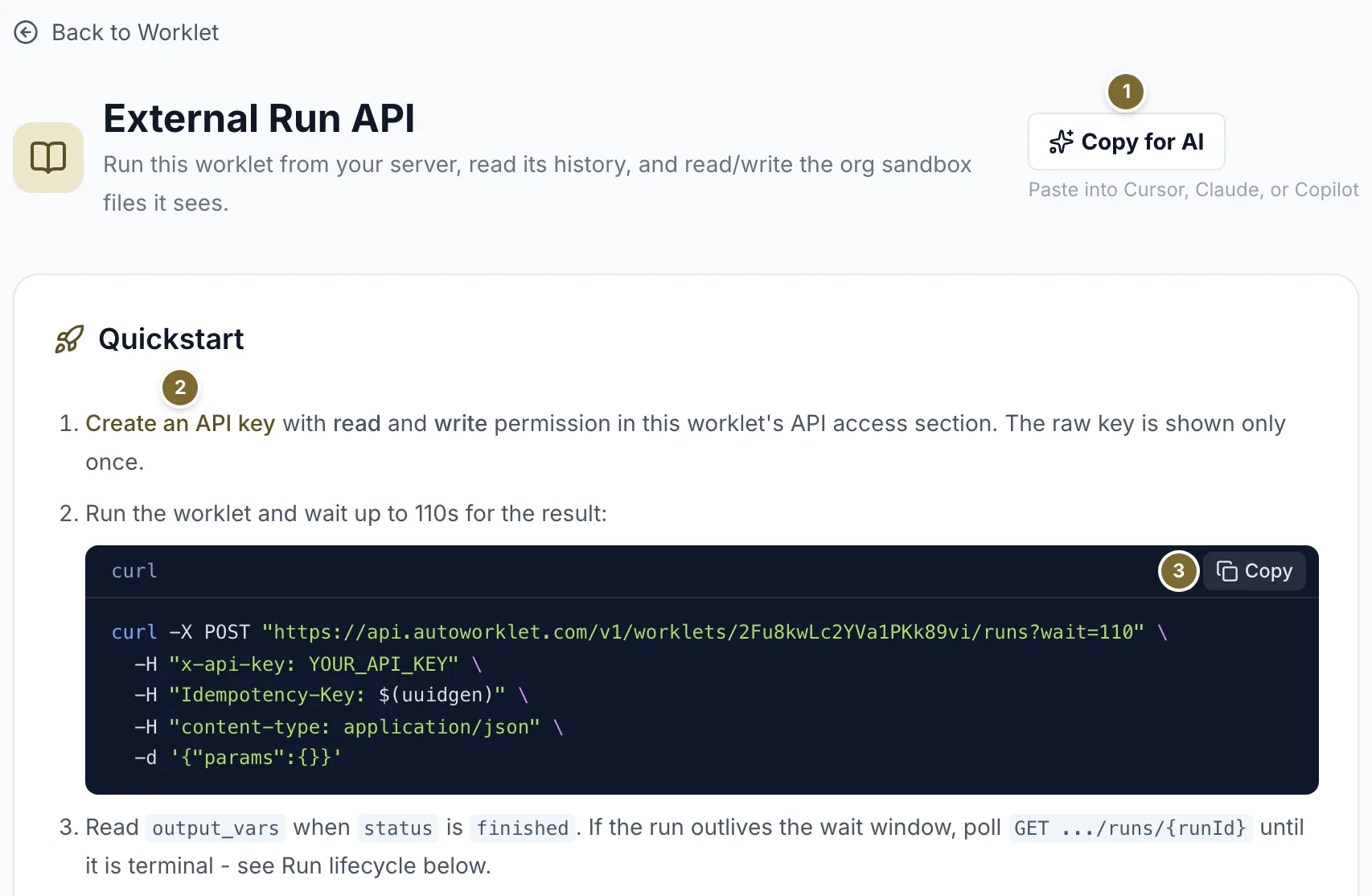
To go back to the automation, click Back to Worklet at the top of the guide.
The samples in this chapter use placeholders.
Replace YOUR_AUTOMATION_ID with the id from the automation's address, and YOUR_API_KEY with your key (Find the ids you need).
curl
This command starts one run with no inputs and waits up to 110 seconds for it to finish.
curl -X POST "https://api.autoworklet.com/v1/worklets/YOUR_AUTOMATION_ID/runs?wait=110" \
  -H "x-api-key: YOUR_API_KEY" \
  -H "Idempotency-Key: $(uuidgen)" \
  -H "content-type: application/json" \
  -d '{"params":{}}'
When the run finishes in time, the reply holds its result:
{
  "runId": "abc123",
  "status": "finished",
  "output_vars": { "result": "...", "rows": [[1, "a"], [2, "b"]] },
  "outputsSource": "outputs",
  "outputVarsTruncation": null,
  "error": null,
  "runReportUrl": "https://...",
  "failureProbeUrl": null,
  "queueTime": "2026-07-18T09:00:00.000Z",
  "startTime": "2026-07-18T09:00:02.000Z",
  "finishTime": "2026-07-18T09:00:41.000Z",
  "source": "api",
  "intakeId": null,
  "intakePhase": null,
  "harness": null,
  "useDraft": false,
  "dryRun": false,
  "dryRunOutcome": null,
  "imageVersion": null,
  "supervisorSeverity": null,
  "supervisorSummary": null,
  "spawnedRuns": [],
  "stopped": false,
  "stoppedAt": null,
  "retryCount": 0,
  "retryPending": false,
  "deduped": false
}statusisfinishedwhen the run worked, orerrorwhen it failed.output_varsholds the results the automation recorded.runReportUrlopens the run report, with a screenshot of each step.
If the run is still going after 110 seconds, status reads running or queued.
That is normal.
See Poll until a run finishes.
Python
The Python examples use only the standard library, with no packages to install.
Paste this helper one time at the top of your file.
Set API_KEY and WORKLET_ID, or better, read them from environment variables.
import json
import urllib.error
import urllib.parse
import urllib.request

BASE = "https://api.autoworklet.com"
API_KEY = "YOUR_API_KEY"
WORKLET_ID = "YOUR_AUTOMATION_ID"

def api(method, path, *, query=None, body=None, headers=None, raw=None, auth=True):
    url = BASE + path
    if query:
        url += "?" + urllib.parse.urlencode({k: v for k, v in query.items() if v is not None})
    hdrs = {"Connection": "close"}
    if auth:
        hdrs["x-api-key"] = API_KEY
    data = None
    if body is not None:
        data = json.dumps(body).encode()
        hdrs["content-type"] = "application/json"
    elif raw is not None:
        data = raw
    if headers:
        hdrs.update(headers)
    req = urllib.request.Request(url, data=data, headers=hdrs, method=method)
    with urllib.request.urlopen(req, timeout=120) as resp:
        raw_out = resp.read()
        return json.loads(raw_out.decode()) if raw_out else None

# The API percent-decodes each segment of a file path once more: encode them first.
def encode_sandbox_path(path):
    return "/".join(urllib.parse.quote(segment, safe="") for segment in path.split("/"))
Then start a run and wait for it.
This example waits up to 30 seconds.
Change 30 to 110 to wait as long as the API allows.
api("POST", f"/v1/worklets/{WORKLET_ID}/runs", query={"wait": 30}, body={"params": {}})Next.js
The Next.js examples keep the key on the server.
Put the three values in .env.local:
# .env.local (server-only - never NEXT_PUBLIC_)
WORKLET_API_BASE_URL=https://api.autoworklet.com
WORKLET_API_KEY=YOUR_API_KEY
WORKLET_ID=YOUR_AUTOMATION_ID
Add this helper as lib/worklet-api.ts.
The server-only import stops Next.js from ever bundling it into a browser page.
// lib/worklet-api.ts
import "server-only";

const BASE = process.env.WORKLET_API_BASE_URL!;
const API_KEY = process.env.WORKLET_API_KEY!;
export const WORKLET_ID = process.env.WORKLET_ID!;

export async function api(
  method: string,
  path: string,
  opts?: {
    query?: Record<string, string | number | undefined>;
    body?: unknown;
    headers?: Record<string, string>;
  },
): Promise<any> {
  const url = new URL(BASE + path);
  if (opts?.query) {
    for (const [k, v] of Object.entries(opts.query)) {
      if (v !== undefined) url.searchParams.set(k, String(v));
    }
  }
  const headers: Record<string, string> = {
    "x-api-key": API_KEY,
    ...(opts?.headers ?? {}),
  };
  let body: string | undefined;
  if (opts?.body !== undefined) {
    body = JSON.stringify(opts.body);
    headers["content-type"] = "application/json";
  }
  const res = await fetch(url, { method, headers, body });
  if (!res.ok) throw new Error(`HTTP ${res.status}: ${await res.text()}`);
  const text = await res.text();
  return text ? JSON.parse(text) : null;
}

// The API percent-decodes each segment of a file path once more: encode them first.
export function encodeSandboxPath(path: string): string {
  return path.split("/").map(encodeURIComponent).join("/");
}
Then add a Route Handler that starts a run and waits for it:
// app/api/worklets/run/route.ts
import { NextResponse } from "next/server";
import { api, WORKLET_ID } from "@/lib/worklet-api";

export async function POST() {
  const result = await api("POST", `/v1/worklets/${WORKLET_ID}/runs`, {
    query: { wait: 30 },
    body: { params: {} },
  });
  return NextResponse.json(result);
}
Warning
Never send the API key to a browser.
Do not name the variables NEXT_PUBLIC_..., and do not call the API from a Client Component.
Your page calls your own route, and your route calls Autoworklet.
26.2Run and wait for the result
POST /v1/worklets/{workletId}/runs starts one run.
It needs a key with Write.
The run uses the automation's published version, or the draft if it was never published.
It uses execution minutes like any other run (How minutes are counted).
You can call it in three ways:
| Call | What you get back |
|---|---|
Without ?wait |
Immediately: the run id and "status": "queued". |
With ?wait=N, N from 0 to 110 |
After up to N seconds: the run's latest state. If it finished in time, the full result. |
With ?wait=N and final=true |
The same, but the wait does not end on a failure the automation will retry. It also waits a few seconds more for a failed run's report link. It still ends after N seconds. |
Queue a run without waiting
Use this when another part of your system checks the result later.
curl -X POST https://api.autoworklet.com/v1/worklets/YOUR_AUTOMATION_ID/runs \
  -H "x-api-key: YOUR_API_KEY" \
  -H "content-type: application/json" \
-d '{"params":{}}'api("POST", f"/v1/worklets/{WORKLET_ID}/runs", body={"params": {}})The reply comes back immediately:
{
  "runId": "abc123",
  "status": "queued"
}
Keep the runId.
You need it to read the result (Poll until a run finishes).
Wait for the result
Add ?wait=N to the same call.
The API checks the run every second and answers as soon as the run finishes, or after N seconds.
A value above 110 counts as 110.
curl -X POST "https://api.autoworklet.com/v1/worklets/YOUR_AUTOMATION_ID/runs?wait=30" \
  -H "x-api-key: YOUR_API_KEY" \
  -H "content-type: application/json" \
  -d '{"params":{}}'
Send the automation's inputs
The -d '{"params":{}}' part of each example sends no inputs.
Put the automation's inputs inside params, one key per input.
The keys are the keys of the automation's input columns (Inputs, outputs and default values).
If the automation has default inputs, Default parameters on the Settings tab shows them with the same keys.
Your server can read the input columns and the default inputs through the API (Read the automation's details).
An AI agent can also list them with get_worklet (Tools reference).
These rules apply to inputs and results:
- Send the worklet's inputs as top-level
paramskeys in a JSON body, withcontent-type: application/json. Inside the sandbox the script receives them as itsparamsdict - a worklet taught to readparams.get("invoice_id")gets exactly what you sent. A JSON list, plain text or another content type is ignored: the run still starts, with no inputs, and the response carrieswarnings: ["body_ignored_not_json"]and anX-Autoworklet-Warningheader. A form body (curl's-ddefault) is read as a form: itsparams[name]=valuefields become inputs, all as text, with no warning, and a form without them is ignored as above. A bare JSON value such as42ornullis refused with a400 Bad Requestpage that is not JSON. Values must be JSON (strings, numbers, booleans, lists, objects), and a list may not directly contain a list: send a table as a list of objects. Do not name an inputdatasetId,rowsorrunId: the server uses those names for the run's row in the worklet's grid. It replaces adatasetIdorrunIdyou send, and arowslist you send keeps the run from getting a row of its own. - To learn which inputs the worklet takes, read
GET /v1/worklets/{workletId}:worklet.defaultParamsare the inputs it was saved with, and thegridcolumns whoseroleisinputare the keys it reads. A run gets only theparamsyou send, never the saveddefaultParams, so send every key it needs. - Results come back in
output_vars. Worklets that publish with the explicit output API (set_output) return exactly the declared values; older worklets return every top-level script variable. outputsSourcetells you which of those two you got:"outputs"means the values were declared withset_output;"output_vars"means they are the script's unfiltered locals - treat them as sensitive and prefer declaring outputs.nullmeans the run published nothing.- The run record cuts a long text value to 1,500 bytes. When a run you start through this API has its own row in the worklet's grid and the script wrote the value there with
complete_row, the response carries it whole. WhenoutputVarsTruncationis not null, the values named in itskeysare still cut; to keep a large result whole, publish it as several smaller outputs. - When the script started other worklets with
spawn_worklet,spawnedRunslists each child'sworkletIdandrunIdin spawn order ([]when none). Read a child with a key for that child's worklet. - Run history also lists the tries Teach made while building the worklet. Each carries
intakePhase(baselineorrehearsal), and itsoutput_varsare the build's, not the finished worklet's. Skip runs whoseintakePhaseis not null when you want the worklet's own results. - It also lists the repair sessions run for the worklet. Each carries
harness(repair_agent), the engine code it ran on a test computer instead of the worklet's script, always as a dry run, and itsoutput_varsare the session's. Skip runs whoseharnessis not null too.
Read the automation's details
GET /v1/worklets/{workletId} returns what the automation is and which inputs it takes.
It needs a key with Read.
curl "https://api.autoworklet.com/v1/worklets/YOUR_AUTOMATION_ID" -H "x-api-key: YOUR_API_KEY"The reply has these fields:
| Field | What it holds |
|---|---|
workletId |
The automation's id. |
worklet.name, worklet.description |
The automation's name and description. |
worklet.state |
draft, published or archived. |
worklet.publishedVersion |
The number of the published version that runs now, the one marked Live in History on the Script tab. |
worklet.defaultParams |
The default inputs from Default parameters on the Settings tab. |
grid |
The automation's grid: its datasetId, and columns, each with a key and a role of input or output. null when the automation has no grid. |
A field the automation does not have is left out of worklet.
A run gets only the params you send, not the default inputs, so send every input the run needs.
A key created by a partner you shared the automation with gets the same reply.
The reply never holds the script.
What a run looks like
Every run in a reply has these fields:
| Field | What it holds |
|---|---|
runId, status |
The run's id and where it is (see Poll until a run finishes). |
output_vars, outputsSource, outputVarsTruncation |
The results, where they came from, and which values were cut. |
error |
The error message when status is error, else null. |
runReportUrl, failureProbeUrl |
Links to the run report and, for a failed run, the failure details. Both are null in a HIPAA organization. |
queueTime, startTime, finishTime |
When the run was queued, started and finished, as ISO dates. |
source |
What started the run, for example api. |
intakeId, intakePhase |
intakeId names the Teach session that started the run. intakePhase is baseline on the tries Teach made while building the automation. On tries from builds before November 16, 2026, it might be rehearsal. Both are null on runs Teach did not start. |
harness |
repair_agent on a repair session: the assistant fixing the script on a test computer, not a run of the script. Its outputs are the session's, not the automation's. null on every other run. |
useDraft, dryRun, imageVersion |
useDraft is true on a run of the draft. dryRun is true on a dry run. imageVersion names the engine version a run tried instead of the automation's own. AI agents start such runs, and so do the test runs of a repair or an engine upgrade. Otherwise they are false, false and null. |
dryRunOutcome |
On a dry run, what it did: stoppedAt names the dry_run_stop step that ended it, or is null when the run went through without stopping. performed lists the steps that ran for real because they are safe to repeat, and skipped the writes the dry run held back. policy is strict or duplicate_tolerant. null on every other run. |
supervisorSeverity, supervisorSummary |
The Supervisor check of the run (none, info, warning or critical) and its summary, after one is written, else null (One run in detail). |
spawnedRuns |
Other automations this run started. |
stopped, stoppedAt |
stopped is true on a run someone stopped, and stoppedAt says when. Its status reads finished, and its results are only what it saved before it stopped. Otherwise they are false and null. |
retryCount, retryPending |
retryCount is how many times the run was tried again, 0 when none. retryPending is true on an error that the automation's Retry settings will run again as the same run (Retries). Keep polling that run. Do not start a new one, or the work runs twice. |
In the automation's Runs tab, runs you start through the API carry an API label (Run history).
26.3Poll until a run finishes
A run includes the time its cloud computer takes to start, so many runs take longer than the 110-second wait. For those, start the run, then ask for it by id until it finishes.
A run moves through these statuses:
| Status | Final? | Meaning |
|---|---|---|
queued | No | Accepted; waiting for a sandbox to start. |
running | No | The automation is executing. |
paused | No | Paused mid-run from the app. It can resume, so keep polling. |
finished | Yes | Completed. Read output_vars for the results. A run a person stopped also reads finished, with stopped: true. |
error | Yes | Failed. error carries the message; the run report has details. Not the outcome while retryPending is true. |
- Only
finishedanderrorare terminal. Treat every other status as "still going". - A
?wait=Nresponse is the latest snapshot, not necessarily the terminal one: when the run outlives the wait window you get backstatus: "running"(orqueued). Always checkstatus, and fall back to pollingGET .../runs/{runId}- see the "Poll until the run finishes" example. GET .../runs/{runId}takes?wait=Ntoo, so a run longer than one wait needs a few long polls rather than a tight loop. A wait on a run that is still going costs1 + floor(N / 10)of the 60 requests a minute (?wait=110is 12), and a run that has already ended is answered at once for 1 (withfinal=true, once its retry and report are no longer pending).- A queued run includes sandbox boot time, so even fast automations commonly take 1-3 minutes end to end. Prefer
?wait=110plus polling over a short wait. - Set your HTTP client's timeout above
N. Hanging up does not end a wait: the server keeps waiting untilNseconds pass or the run ends, and a GET wait's requests stay counted. - An
errorwithretryPending: trueis not the outcome: the worklet's retry setting runs it again as the samerunId, which goes back toqueuedwithretryCountone higher. Keep polling that run; do not start a new one, or the work runs twice. - Add
final=trueto a?wait=Ncall to wait through those retries, and for a failed run's report link, which lands a few seconds afterstatus: "error". The wait still ends after N seconds, so checkstatusandretryPendingin the reply. - A run a person stopped reads
finishedwithstopped: trueand astoppedAttime. Itsoutput_varsare what the script had published when it stopped, which may be partial or empty. - A lost response (a timeout or a dropped connection) does not tell you whether the run started, and a plain retry starts a second run. Send an
Idempotency-Keyheader with a value of your own, such as a UUID or an order id (1-255 characters ofA-Z a-z 0-9 _ . : -), and send the same key on every retry of that call. A retry starts no run: it answers the first call'srunIdand that run's currentstatus, withdeduped: trueand anIdempotent-Replayed: trueheader. The same key with differentparamsanswers422 idempotency_key_reused. A key is remembered as long as its run exists.
Poll until the run finishes
These examples start a run and wait up to 110 seconds for it.
If it is still going, they check it every 5 seconds until it reads finished, or error with retryPending false.
RUN_ID=$(curl -s -X POST "https://api.autoworklet.com/v1/worklets/YOUR_AUTOMATION_ID/runs?wait=110" \
  -H "x-api-key: YOUR_API_KEY" \
  -H "content-type: application/json" \
  -d '{"params":{}}' | python3 -c 'import sys,json; print(json.load(sys.stdin)["runId"])')
STATUS=""
until [ "$STATUS" = "finished" ] || [ "$STATUS" = "error" ]; do
  sleep 5
  RUN=$(curl -s "https://api.autoworklet.com/v1/worklets/YOUR_AUTOMATION_ID/runs/$RUN_ID" \
    -H "x-api-key: YOUR_API_KEY")
  # An error with retryPending runs again as this same run, so it is not the end.
  STATUS=$(printf '%s' "$RUN" | python3 -c 'import sys,json; r=json.load(sys.stdin); print("retrying" if r.get("retryPending") else r["status"])')
done
printf '%s\n' "$RUN"import time
run = api("POST", f"/v1/worklets/{WORKLET_ID}/runs", query={"wait": 110}, body={"params": {}})
# An error with retryPending runs again as this same run, so keep polling it.
while run["status"] not in ("finished", "error") or run.get("retryPending"):
time.sleep(5)
run = api("GET", f"/v1/worklets/{WORKLET_ID}/runs/{run['runId']}")
print(run["status"], run.get("output_vars"))The in-app API guide has the same loop for Next.js, as a helper in lib/run-worklet.ts.
In a Route Handler, keep the total time under your host's request timeout.
For longer runs, store the runId and check it on later requests.
Read one run
GET /v1/worklets/{workletId}/runs/{runId} returns one run.
It needs a key with Read.
Replace RUN_ID with the runId the start call returned.
curl https://api.autoworklet.com/v1/worklets/YOUR_AUTOMATION_ID/runs/RUN_ID \
-H "x-api-key: YOUR_API_KEY"api("GET", f"/v1/worklets/{WORKLET_ID}/runs/RUN_ID")The reply has the same fields as a finished ?wait call.
Add ?include=params to the address to also get the run's params, the inputs it started with.
Tip
Poll every few seconds, not in a tight loop.
A key can make at most 60 requests a minute.
A run that reads paused was paused from the app and can resume, so keep polling it.
26.4Get a call when a run ends
Instead of polling, a webhook sends a signed POST to an address of yours each time a run of the automation ends.
Webhooks are on the automation's Triggers tab, in the Webhooks section below Shared with.
Only the automation's owner and your organization's admins and managers can see and change them.
- In Endpoint URL, enter an address that starts with
https://. - Under Send when, select Finished, Failed, Stopped, or any of them.
- Optionally, add a Description.
- Click Add webhook.
- Copy the Signing secret that appears under the webhook. It is shown only one time.
How to verify a delivery, in the same section, opens the in-app API guide at the request body and the signature check.
Your server can also add and change webhooks with the /v1/worklets/{workletId}/webhooks routes, which the in-app API guide lists (Quick start).
Test runs, such as a test of the draft or of an AI repair's fix, are not sent.
A webhook your server adds with includeTrialRuns gets them too, and shows with dry and draft runs.
The run of an AI repair session itself is never sent, even then: it is the repair agent's run, not a run of the automation.
When a webhook is off
A webhook that is off shows Off, and a line under it says why. Nothing is sent to it, and deliveries waiting to be retried are not sent either.
| The line says | Why | What to do |
|---|---|---|
| Turned off, with a time | Someone clicked Turn off. | Click Turn on. |
| Turned off because deliveries kept failing | 20 deliveries in a row failed every retry. | Make your endpoint answer with a 2xx status, then click Turn on. |
| Turned off because the person who added it can no longer manage this worklet's webhooks | That person left your organization, or they did not create the automation and are no longer an admin or manager. | Delete the webhook, and add a new one if you still need it. |
A webhook turned off because the person who added it can no longer manage it has no Turn on button.
It stays off while that person still cannot manage the automation's webhooks, and the API refuses to turn it on with webhook_creator_lost_access.
A webhook turned off for another reason stays off too while the person who added it cannot manage the automation's webhooks.
Clicking Turn on then shows "The person who added this webhook can no longer manage this worklet's webhooks, so it cannot be turned on."
Delete it, and add a new one if you still need it.
Note
Webhooks are not available in a HIPAA organization.
26.5Check what a webhook delivery vouches for
The signature on a run-completion webhook's delivery proves Autoworklet sent it.
Its outcomeAttested field says whether Autoworklet also vouches for the run's outcome: its status, error, outputs and report link.
An incoming webhook that starts a run (Webhooks) has no outcomeAttested.
outcomeAttested |
What it means |
|---|---|
true |
The run's own sandbox wrote the outcome, and no member's app or computer, and no other run, can change it. The automation's script runs in that sandbox, so the people who can edit the automation decide what it reports. |
false |
A member's app or computer could have written the outcome. Any member of your organization can finish a run of their own by hand. Some engines report a run as the person who started it. |
A delivery is sent either way.
Each time a run ends, it sends one delivery, so a false delivery is never followed by a true one for the same run.
The run's GET does not say whether its outcome was attested.
Before your system pays, approves or ships something because of a delivery, decide on the delivery you got whether a member's word is enough.
Today every delivery says false, because no released engine vouches for its outcome yet.
Note
A delivery with outcomeAttested: true keeps an output that was too long to store whole in its shortened form, and outputVarsTruncation names it.
26.6Run history
GET /v1/worklets/{workletId}/runs lists the automation's runs, newest first.
It needs a key with Read.
Use it to catch up on runs your system missed, or to build a report.
curl "https://api.autoworklet.com/v1/worklets/YOUR_AUTOMATION_ID/runs?limit=20" \
-H "x-api-key: YOUR_API_KEY"api("GET", f"/v1/worklets/{WORKLET_ID}/runs", query={"limit": 20})The reply holds one page of runs and a cursor for the next page:
{
  "runs": [
    {
      "runId": "abc123",
      "status": "finished",
      "output_vars": { "result": "...", "rows": [[1, "a"], [2, "b"]] },
      "outputsSource": "outputs",
      "outputVarsTruncation": null,
      "error": null,
      "runReportUrl": "https://...",
      "failureProbeUrl": null,
      "queueTime": "2026-07-18T09:00:00.000Z",
      "startTime": "2026-07-18T09:00:02.000Z",
      "finishTime": "2026-07-18T09:00:41.000Z",
      "source": "api",
      "intakeId": null,
      "intakePhase": null,
      "harness": null,
      "useDraft": false,
      "dryRun": false,
      "dryRunOutcome": null,
      "imageVersion": null,
      "supervisorSeverity": null,
      "supervisorSummary": null,
      "spawnedRuns": [],
      "stopped": false,
      "stoppedAt": null,
      "retryCount": 0,
      "retryPending": false
    }
  ],
  "nextCursor": "eyJ0IjoxNzIxMjkzMjQwMDAwLCJpIjoiYWJjMTIzIn0"
}
You can add these to the address:
| Query | What it does |
|---|---|
limit |
How many runs per page, from 1 to 100. The default is 20. |
cursor |
The nextCursor value from the previous page. nextCursor is null on the last page. |
status |
Only runs with this status: queued, running, finished, error or paused. Repeat it for runs with any of several statuses, for example status=finished&status=error. |
since |
Only runs queued at or after this time, as an ISO 8601 date or date-time, for example 2026-07-18 or 2026-07-18T10:00:00Z. A time without an offset is UTC. Write the + of an offset such as +07:00 as %2B. |
until |
Only runs queued before this time, in the same format. |
source |
Only runs that one source started, as the run's source field reads, for example api, schedule or webhook. |
include |
include=params adds each run's params: the inputs it started with. A page with params ends early when it holds 8 MiB, so it can hold fewer runs than limit. Follow nextCursor for the rest. |
The history includes every run of the automation, started in any of these ways:
- In the app.
- By a schedule.
- By a trigger.
- By a widget.
- By the API.
It also includes the tries Teach made while it built the automation.
Those carry intakePhase set to baseline, or rehearsal on tries from builds before November 16, 2026.
Skip them when you want only the automation's own results.
A key created by a partner you shared the automation with sees only the runs that partner started.
26.7Files
An automation reads and writes files in two folders on its cloud computer: my_worklet_files and shared_files.
The API can list, upload, download and delete files in those folders (Your organization's files).
These are your organization's whole folder trees, not only this automation's files.
Every path starts with my_worklet_files/ or shared_files/, and must not contain ...
Encode each part of the path between the / characters before you send it: urllib.parse.quote(part, safe="") in Python, encodeURIComponent(part) in JavaScript.
The API decodes each part one more time after reading the request, so a file listed as Q3 100%.pdf is sent as Q3%20100%25.pdf.
The Python setup above has encode_sandbox_path for this, and the Python examples below use it.
The Next.js setup has encodeSandboxPath.
Uploads and downloads go through a signed link that the API hands out. Each link works for 15 minutes. An upload can be up to 50 MB.
List a folder
GET /v1/worklets/{workletId}/files lists one folder.
It needs a key with Read.
With an empty path, it returns the two top folders.
curl "https://api.autoworklet.com/v1/worklets/YOUR_AUTOMATION_ID/files?path=shared_files/inputs" \
-H "x-api-key: YOUR_API_KEY"api("GET", f"/v1/worklets/{WORKLET_ID}/files", query={"path": encode_sandbox_path("shared_files/inputs")})The reply lists the folder's subfolders and files:
{
  "path": "shared_files/inputs",
  "folders": ["archive"],
  "files": [
    {
      "name": "data.csv",
      "size": 1284,
      "contentType": "text/csv",
      "updated": "2026-07-18T09:00:00.000Z"
    }
  ],
  "nextPageToken": null
}
A page holds up to 100 entries by default, and up to 1,000 with limit.
When nextPageToken is not null, pass it back as pageToken for the next page.
Upload a file
An upload takes two steps.
First, your server asks for an upload link with POST /v1/worklets/{workletId}/files, using a key with Write.
Then it sends the file's bytes to that link with PUT, with the headers the first step returned.
UPLOAD=$(curl -s -X POST https://api.autoworklet.com/v1/worklets/YOUR_AUTOMATION_ID/files \
  -H "x-api-key: YOUR_API_KEY" \
  -H "content-type: application/json" \
  -d '{"path":"shared_files/inputs/data.csv","contentType":"text/csv"}')
UPLOAD_URL=$(printf '%s' "$UPLOAD" | python3 -c 'import sys,json; print(json.load(sys.stdin)["uploadUrl"])')
CT=$(printf '%s' "$UPLOAD" | python3 -c 'import sys,json; print(json.load(sys.stdin)["headers"]["Content-Type"])')
RANGE=$(printf '%s' "$UPLOAD" | python3 -c 'import sys,json; print(json.load(sys.stdin)["headers"]["x-goog-content-length-range"])')
curl -X PUT --data-binary @data.csv \
  -H "Content-Type: $CT" \
  -H "x-goog-content-length-range: $RANGE" \
"$UPLOAD_URL"minted = api(
"POST",
f"/v1/worklets/{WORKLET_ID}/files",
body={"path": encode_sandbox_path("shared_files/inputs/data.csv"), "contentType": "text/csv"},
)
with open("data.csv", "rb") as f:
data = f.read()
req = urllib.request.Request(
minted["uploadUrl"],
data=data,
headers={**minted["headers"], "Connection": "close"},
method="PUT",
)
urllib.request.urlopen(req, timeout=120).read()The first step returns the link and the headers to send with it:
{
  "path": "shared_files/inputs/data.csv",
  "uploadUrl": "https://storage.googleapis.com/...",
  "method": "PUT",
  "headers": {
    "Content-Type": "text/csv",
    "x-goog-content-length-range": "0,52428800"
  },
  "expiresAt": "2026-07-18T09:15:00.000Z"
}- Send every header in
headersexactly as returned, or the upload is refused. The Python example sends them all. The curl example sendsContent-Typeandx-goog-content-length-range, which every upload has. - By default an upload replaces a file with the same path.
Add
"overwrite": falseto the first step's body to refuse the upload when the file already exists.headersthen also holdsx-goog-if-generation-match: 0, so add-H "x-goog-if-generation-match: 0"to the curlPUT. - The automation sees the file at the same path on its next run.
Download a file
GET /v1/worklets/{workletId}/file?path=... returns the file's details and a downloadUrl.
It needs a key with Read.
Fetch downloadUrl within 15 minutes.
curl "https://api.autoworklet.com/v1/worklets/YOUR_AUTOMATION_ID/file?path=shared_files/inputs/data.csv" \
-H "x-api-key: YOUR_API_KEY"meta = api("GET", f"/v1/worklets/{WORKLET_ID}/file", query={"path": encode_sandbox_path("shared_files/inputs/data.csv")})
# meta["downloadUrl"] is a 15-minute signed GET URL
req = urllib.request.Request(meta["downloadUrl"], headers={"Connection": "close"}, method="GET")
content = urllib.request.urlopen(req, timeout=120).read()The reply holds the file's details and its download link:
{
  "path": "shared_files/inputs/data.csv",
  "size": 1284,
  "contentType": "text/csv",
  "downloadUrl": "https://storage.googleapis.com/...",
  "expiresAt": "2026-07-18T09:15:00.000Z"
}
Delete a file
DELETE /v1/worklets/{workletId}/file?path=... deletes one file.
It needs a key with Write.
The reply is { "path": ..., "deleted": true }.
The file stops counting toward your organization's storage after the delete is processed.
Upload or download from a browser
A browser can use the signed link, but it must never hold the API key.
Let your server ask for the link, hand the link to the page, and let the page PUT or GET it directly.
This also avoids the 4.5 MB request limit of hosts such as Vercel.
The Next.js tab of the in-app guide's Examples has the Route Handlers and the browser code for this.
Important
In a HIPAA organization, listing and downloading files through the API is refused with hipaa_org.
Uploads and deletes still work.
A key created by a partner you shared the automation with cannot list, upload, download or delete files at all (share_forbidden).
If something goes wrong
| What you see | What it means | What to do |
|---|---|---|
400 invalid_path |
The path is missing, does not start with my_worklet_files/ or shared_files/, contains .., or has a % that was not encoded. |
Fix the path, and encode each part between the / characters. |
404 file_not_found |
No file at that path. | List the folder to check the name. |
The PUT fails with 403 |
The link expired, or the headers were not sent exactly as returned. | Ask for a new link and send the returned headers unchanged. |
The PUT fails with 412 |
You set "overwrite": false and the file exists. |
Use another path, or leave overwrite out to replace the file. |
The PUT is refused for size |
The file is over 50 MB. | Split the file. |
26.8Errors and limits
- Every error the API answers is JSON with a single machine-readable code:
{ "error": "<code>" }. Branch on the code, not the message. Every response the API answers also carries anX-Request-Idheader, and an unexpected500 internal_errorrepeats it in the body asrequestId: quote it when you contact support. A request the platform refuses before the API reads it gets the platform's own error page instead, which is not JSON and carries noX-Request-Id, for example a400for a path that is not valid percent-encoding or a JSON body that does not parse or is a bare value such as42, a413for a body over 32 MiB or a form with more than 1,000 fields, or a415for a body in a charset orContent-Encodingthe platform does not read, such asapplication/json; charset=iso-8859-1. Check theContent-Typebefore parsing an error body.
A few errors carry more: plan_upgrade_required and hipaa_org add a message for people, and rate_limited adds retryAfter.
Error codes
| HTTP | Code | Meaning |
|---|---|---|
| 400 | params_must_be_object | params must be a JSON object. |
| 400 | invalid_params | A value in params cannot be stored: a list directly inside a list, an empty or __x__ key, nesting deeper than 20 levels, or a key path (params.<key> and the keys inside it) over 1,500 bytes. keys names the params at fault. |
| 400 | invalid_wait | wait is not a number. |
| 400 | invalid_final | final is not true, 1, false or 0 (in upper or lower case), or is given twice. |
| 400 | invalid_idempotency_key | The Idempotency-Key header is empty, given twice, longer than 255 characters, or holds a character other than A-Z a-z 0-9 _ . : -. |
| 400 | invalid_limit | limit is not an integer in range: 1-100 on run history, 1-1000 on a file listing, 1-50 on webhook deliveries. |
| 400 | invalid_cursor | cursor is not a value a previous page returned in nextCursor, or cursor or pageToken was given more than once. |
| 400 | invalid_status | A status is not one of the five run statuses. |
| 400 | invalid_since | since is not an ISO 8601 date or date-time, such as 2026-07-18 or 2026-07-18T10:00:00Z, or is given twice. A time without an offset is UTC; send an offset's + as %2B. |
| 400 | invalid_until | until is not an ISO 8601 date or date-time, or is given twice. |
| 400 | invalid_source | source is not 1-32 characters of a-z 0-9 _ -, or is given twice. |
| 400 | invalid_include | include names something other than params. |
| 400 | invalid_path | Path is missing, given more than once, outside my_worklet_files / shared_files, contains .., or has a segment that is not valid percent-encoding, such as a bare % (encode each segment: a listed 100%.csv is sent as 100%25.csv). |
| 400 | invalid_content_type | contentType is not a string. |
| 400 | invalid_overwrite | overwrite is not a boolean. |
| 400 | invalid_webhook_url | url is not an https URL of at most 2048 characters, names an IP address or localhost instead of a host name, or carries a user name or password. message says which. A create body that is not a JSON object (a form, text or a JSON array) gets this code too, with a message asking for JSON. |
| 400 | invalid_events | events is not a non-empty list of run.finished, run.error and run.stopped. |
| 400 | invalid_description | A webhook description is not a string of at most 200 characters. |
| 400 | invalid_include_trial_runs | includeTrialRuns is not a boolean. |
| 400 | invalid_worklet_ids | On an organization webhook (/v1/orgs/{orgId}/webhooks): workletIds is not null or a list of 1-100 distinct ids of the organization's worklets. A worklet webhook takes no workletIds. |
| 400 | invalid_enabled | enabled is not a boolean, or the enable body is not a JSON object (message says which). |
| 400 | invalid_json | The body is sent as JSON and does not parse, or is a bare value such as 42 rather than an object or list. Deployed, the platform refuses such a body before the API sees it, with a 400 Bad Request page that is not JSON, so expect that page rather than this code. |
| 401 | missing_api_key | No x-api-key or Authorization: Bearer header. |
| 401 | invalid_api_key | The key does not exist. |
| 401 | revoked_api_key | The key was revoked, or it is an OAuth access token that a refresh has replaced. |
| 401 | expired_token | An OAuth access token or a key minted with an expiry has expired. |
| 403 | insufficient_permission | The key lacks the read or write permission this endpoint needs. |
| 403 | worklet_mismatch | The key is bound to a different worklet, or is an organization key (an org key reaches worklets through the org run routes /v1/orgs/{orgId}/worklets/{workletId}/runs or the org MCP server). |
| 403 | plan_upgrade_required | External Run API calls need the Pro plan or above. The same key still works over MCP. A shared-worklet key also gets this, over MCP too, once the worklet's organization is no longer on a plan with worklet shares (Pro and above). |
| 403 | not_org_member | The person who minted the key is no longer a member of the worklet's organization, or, for a shared-worklet key, of the organization that accepted the share and pays for its runs. |
| 403 | share_forbidden | A shared-worklet key cannot reach the org's files or manage the worklet's webhooks. |
| 403 | worklet_files_forbidden | The key's owner may not change files in this automation's folder (my_worklet_files/worklets/{workletId}/). An upload link or a delete there takes the automation's owner or an org admin or manager. |
| 403 | hipaa_org | A HIPAA organization's files cannot be listed or downloaded through the API, and it cannot create, rotate or turn on a webhook. |
| 403 | oauth_forbidden | An app connected by signing in (an OAuth access token) cannot manage webhooks, reads included, because a webhook keeps sending after the app is disconnected. Use an API key, or the worklet's Webhooks section. |
| 403 | webhook_forbidden | The key's owner may not manage these webhooks. A worklet's webhooks take its creator or an org admin or manager; an organization's take an org admin or manager. |
| 403 | org_mismatch | On an org URL (/v1/orgs/{orgId}/...): the key is not an organization key for that org. |
| 404 | worklet_not_found | The worklet no longer exists. |
| 404 | run_not_found | No run with that id on this worklet. |
| 404 | file_not_found | No sandbox file at that path. |
| 404 | webhook_not_found | No webhook with that id on this worklet or organization. |
| 404 | not_found | No route has that method and path. |
| 409 | worklet_has_no_owner | A shared-worklet key, on a worklet that has no owner to run as. Retrying will not help; ask the worklet's organization. |
| 409 | worklet_has_no_org | The worklet belongs to no organization, so no run can start. Retrying will not help. |
| 409 | foreign_service_identity | The worklet's owner is another organization's service identity, so no run can start. Retrying will not help. |
| 409 | run_not_running | The run is not running, so there is nothing to stop; status names its status. A queued cloud run cannot be stopped yet; a run waiting for a registered machine can. |
| 409 | no_sandbox_yet | The run is running but its sandbox has not started yet. Try again in a few seconds. |
| 409 | teach_build_run | The run is a try Teach made while building the worklet. Stop it from the Teach page. |
| 409 | not_cancellable | The run executes on a provider other than Modal, which the API cannot stop. |
| 409 | webhook_limit_reached | The worklet or organization already has 10 webhooks. Delete one first. |
| 409 | webhook_creator_lost_access | The webhook cannot be turned on because the person who added it can no longer manage it. That holds whatever turned it off, disabledReason: "creator_lost_access" or another. Delete it, and add a new one if you still need it. |
| 413 | payload_too_large | The run's params do not fit in one run record (see Limits). A body over the platform's 32 MiB request limit gets a 413 page that is not JSON instead. |
| 422 | idempotency_key_reused | This Idempotency-Key already started a run with different params, or names a run someone else started. Send a new key for a new request. |
| 429 | rate_limited | Per-key rate limit hit. The body carries retryAfter (seconds) and the response sets a Retry-After header. |
| 500 | internal_error | An unexpected server error. Quote the body's requestId (the X-Request-Id header) when you contact support. |
| 502 | engine_unavailable | The engine did not confirm a stop. Read the run, and retry while it is still running. |
Limits
- Rate limit: 60 REST requests per minute per key (fixed per-minute window). On
429, waitretryAfterseconds and retry. The MCP endpoint has its own budget of 240 calls per minute per key, so an agent does not use up your REST quota. waitis capped at 110 seconds; larger values are clamped, not rejected.- Run history pages are capped at
limit=100(default 20). - File listing pages are capped at
limit=1000(default 100). FollownextPageToken, sent back aspageToken, for the rest. - A run's
paramsmust fit in one run record. Over 1 MiB as stored (a number takes 8 bytes, a string or key its UTF-8 bytes plus 1), or over 40,000 index entries (2 forparamsand for each key in it at any depth, plus 1 per distinct list element), answers413 payload_too_large. - File uploads are capped at 50 MB via the signed URL's
x-goog-content-length-rangeheader; signed upload/download URLs expire after 15 minutes. cpu,memory, andgpuare never accepted from the caller - memory is the worklet's own setting, cpu is the engine's, and the worklet's provider decides the GPU. Send only aparamsobject.- Proxying file bytes through a Vercel route (instead of a browser PUT/GET of the signed URL) is capped at 4.5 MB by the host.
- Credentials: the REST routes take the key as
x-api-keyor asAuthorization: Bearer <key>. An OAuth access token a connector holds for this worklet works on them too, with the permissions approved on its consent screen and the same plan check as a key, except on the webhook routes, which refuse it with403 oauth_forbidden. It lasts an hour; after that it answers401 expired_token, and the connector refreshes it for a new one. A refresh retires the token it replaces at once, so that old token answers401 revoked_api_keyeven within its hour.
A few more limits apply:
| Limit | Value |
|---|---|
| Request body | 1 MB. A bigger body answers 413 payload_too_large. |
| File list page | 1 to 1,000 entries, 100 by default |
| Key description | 200 characters |
What to do about common errors
For the key errors (missing_api_key, invalid_api_key, revoked_api_key, not_org_member, insufficient_permission), see What a key can and cannot do.
| Code | What to do |
|---|---|
plan_upgrade_required |
The organization's plan does not include the External Run API. Upgrade to Pro or above (Change your plan), or connect an AI agent over MCP, which works on every plan. |
worklet_mismatch |
The automation id in the address is wrong, the key belongs to another automation, or it is an organization key. Check the id, and use the key for this automation. |
rate_limited |
Wait the number of seconds in retryAfter, then retry. Poll less often. |
expired_token |
For an API key, it passed the expiry it was created with: create a new key (API keys). For an AI app, its sign-in expired: the app signs in again by itself. If it cannot, connect it again. |
worklet_not_found |
The automation this key belongs to was deleted. Create a key on an automation that exists. |
26.9Organization data API
An organization key can also read and write your organization's datasets: the tables on the Data page, and every automation's grid (Datasets). Use it to load rows from another system, or to read results in bulk. These calls need the Pro plan or above, like the rest of the External Run API. An AI agent can do the same through the organization server on every plan (The organization server).
You need:
- An organization key, which only an admin or manager can create (Create an organization key).
A key for one automation is refused with
org_mismatch. - Your organization's id in the path, in place of
{orgId}(Find the ids you need). The workspace's short name does not work here.
| Call | Permission | What it does |
|---|---|---|
GET /v1/orgs/{orgId}/datasets |
read | Lists the datasets, with their columns. An automation's grid names the automation in workletId. |
GET /v1/orgs/{orgId}/datasets/{datasetId}/records |
read | Lists records, newest first. limit is 1 to 500, 100 by default. Pass nextCursor back as cursor. |
GET .../records/{recordId} |
read | Reads one record. |
POST .../records |
write | Adds one record. Body: { "id"?: "...", "data": { ... } }. |
POST .../records/batch |
write | Adds 1 to 500 records in one call. If one is refused, none is written. Listed newest first, the batch shows in reverse order, never shuffled. |
PATCH .../records/{recordId} |
write | Changes the keys you send and leaves the rest. |
DELETE .../records/{recordId} |
write | Deletes one record. The key's creator must still be an admin or manager. |
POST .../dispatch |
write | Runs the ready rows of an automation's grid now. Send your own token as the JSON body { "token": "..." } or the Idempotency-Key header, and send the same token again on a retry. Returns { runs, claimed, shortfall }. |
To work with an automation's grid, take its id from gridDatasetId in GET /v1/orgs/{orgId}/worklets, which lists your automations.
Do not build the id from the automation's id: an older automation's grid has an id of another shape.
A grid the automation no longer uses can still name it in workletId, and rows written there never run.
This example does these things:
- Lists the datasets.
- Adds records.
- Reads them a page at a time.
- Changes one record.
- Deletes one record.
Replace:
YOUR_ORG_IDwith your organization's id.YOUR_ORG_API_KEYwith your organization key.DATASET_IDwith an id from the first call.RECORD_IDwith a record's id.
ORG=YOUR_ORG_ID
# Discover dataset ids
curl "https://api.autoworklet.com/v1/orgs/$ORG/datasets" -H "x-api-key: YOUR_ORG_API_KEY"

# Add one record, then several
curl -X POST "https://api.autoworklet.com/v1/orgs/$ORG/datasets/DATASET_ID/records" \
  -H "x-api-key: YOUR_ORG_API_KEY" -H "content-type: application/json" \
  -d '{"data":{"email":"[email protected]","stage":"new"}}'
curl -X POST "https://api.autoworklet.com/v1/orgs/$ORG/datasets/DATASET_ID/records/batch" \
  -H "x-api-key: YOUR_ORG_API_KEY" -H "content-type: application/json" \
  -d '{"records":[{"data":{"email":"[email protected]"}},{"data":{"email":"[email protected]"}}]}'

# Page through records (pass nextCursor back as cursor)
curl "https://api.autoworklet.com/v1/orgs/$ORG/datasets/DATASET_ID/records?limit=100" \
  -H "x-api-key: YOUR_ORG_API_KEY"

# Change one column, leave the rest
curl -X PATCH "https://api.autoworklet.com/v1/orgs/$ORG/datasets/DATASET_ID/records/RECORD_ID" \
  -H "x-api-key: YOUR_ORG_API_KEY" -H "content-type: application/json" \
  -d '{"data":{"stage":"contacted"}}'

# Delete one record
curl -X DELETE "https://api.autoworklet.com/v1/orgs/$ORG/datasets/DATASET_ID/records/RECORD_ID" \
  -H "x-api-key: YOUR_ORG_API_KEY"
Tip
Send your own id with each new record.
If a call times out and you send it again, a record that was already written answers 409 record_exists and nothing is written twice.
A 409 on a retry means the first try worked.
On an automation's grid you can write only input columns.
A row whose inputs are all filled becomes Ready and waits.
It runs on the next Run N ready rows, schedule, POST .../dispatch call, or agent request, not by itself (Queue rows and run them later).
If something goes wrong
Every refused write is checked before anything is saved, and the reply names the keys at fault, for example { "error": "output_column", "keys": ["score"] }.
Half of an emoji (a lone UTF-16 surrogate, which cutting text by length can leave) in a key or a value is saved as the replacement character � (U+FFFD).
The reply shows the saved form.
| Code | What it means |
|---|---|
400 output_column |
On a grid, you wrote to an output column. Outputs belong to the run. |
400 unknown_column |
On a grid, a key is not one of the grid's columns. |
400 invalid_key |
A key is empty, starts with __, or contains ., *, ~, /, [ or ]. Or a key is longer than 1,495 bytes (1,494 bytes in a PATCH). Or a key would be the same as another key after half of an emoji in it is saved as �. |
400 invalid_value |
A value holds a list directly inside another list at any depth, or nests more than 19 levels deep. Or it has a key inside it that is empty, or starts and ends with __. Or a key inside it makes its path from data longer than 1,500 bytes. Or a key inside it would match another key of its map after half of an emoji in it is saved as �. The reply's keys names it. |
400 invalid_id |
A record id you send is not text, is empty, is . or .., or contains /. Or it starts and ends with __, holds half of an emoji, or is longer than 1,500 bytes. An id in the address gets the same answer when it contains / (sent as %2F), starts and ends with __, or is over 1,500 bytes. |
400 invalid_data, invalid_records |
data is not an object, or records is not a list of 1 to 500 records. |
400 empty_data |
A PATCH sent no keys. |
400 duplicate_id |
One batch names the same id twice. |
400 invalid_token |
A dispatch call sent no token, a malformed one, or a body token and an Idempotency-Key that differ. A token is 1 to 255 characters, each an English letter, a digit, _, ., : or -. |
400 not_a_grid |
A dispatch call named a dataset that is not an automation's grid, or a grid its automation no longer uses. Dispatch the automation's current grid, its gridDatasetId. |
404 dataset_not_found, record_not_found |
The id is wrong. List the datasets or records to check. |
409 record_exists |
A record with that id exists. The reply's ids names it. |
409 row_in_use |
On an automation's grid, a run is working on that row right now, so a PATCH or DELETE changed nothing. The reply's ids names it. Try again after the run finishes. |
403 admin_or_manager_required |
The key's creator is no longer an admin or manager, so the key cannot delete records. |
403 org_mismatch |
The key is not an organization key for this organization. |